Step by step
Open Prices → Price changes
Every price change in your store, newest first: made in Shopify, by one of the app's sales or from the chat. A line at the top says since when price changes are recorded and orders kept. Show older changes goes further back.
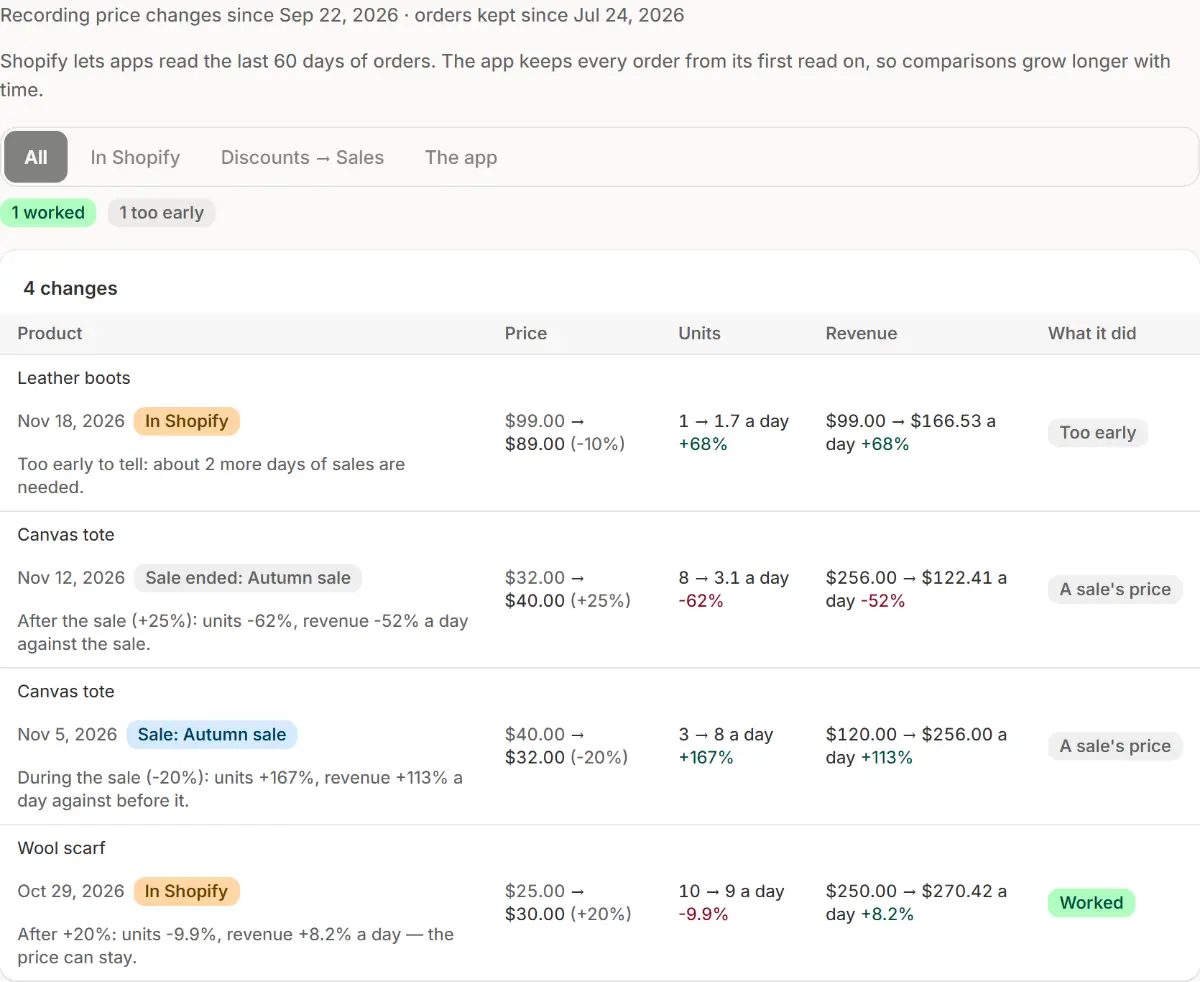
The app's real screen, with example store data. Read a row
The product (it opens its page), the price before → after, units and revenue a day before → after, and What it did. The time before a change runs from the previous change, at most 30 days unless you set another; the time after runs to the next change or today.
Read what it did
Worked: the new price earns more a day. Hurt: the old one earned more. No real change: revenue moved less than 5%. Too early: each side needs at least 3 days and 5 orders, and the line says about how many more days. No sales: nothing sold before or after. A change a sale made shows A sale's price.
Filter by who changed it
Changed by: All, In Shopify (by hand, an import or another app), Discounts → Sales (one of the app's sales, or its end) or The app (the chat's price card, or Undo in History). The badges above the list count how many worked, hurt, are too early or changed nothing.
Ask what worked
Ask what worked, in the page's head, asks the chat about your recent price changes. Or ask your own, such as “Which price changes hurt?”: it answers from the same numbers, with a table under the answer.
Look at one product
A product's page in Products shows its Price history: what the last change did, in one sentence and a colour, then every price it had with what sold at it. Go back to … asks the chat to set the old price again; you confirm on its card, and History can undo it.

Tips
- When every variant sold has a cost per item, the verdict follows profit a day rather than revenue: a raise that sells a few fewer but earns more on each one worked.
- Settings → Prices → Price history: Record price changes (on by default) and Compare with the time before a change (14, 30 or 60 days).
- A sale's own numbers, against the days before it, are on Analytics → Results.
What to check
- The line at the top says since when changes are recorded.
- A price you changed by hand in Shopify shows In Shopify.
Common mistakes
- Reading a verdict as a split test: shoppers aren't divided, so a season or an ad can move the numbers too.
- Judging a change after a day: Too early means it needs more days and orders.
- Turning off Record price changes: nothing is recorded while it's off, and turned on again, recording starts anew from that day.
The plan you need
On the Free planEvery plan. Shopify lets apps read the last 60 days of orders; the app keeps every order it has read, so comparisons grow longer with time.
Your questions
What does the app keep about my orders?
Only an order's time and each line's product, units and amount, never a buyer's name, address or email. Everything is erased when Shopify asks the app to erase the store's data, 48 hours after uninstall.
Does it see changes made outside the app?
Yes. Prices changed by hand in Shopify, by an import or by another app show as In Shopify. The app keeps them current from Shopify's own updates and checks again every day for anything missed.
Related tutorials
- Put prices backEvery price is saved before a sale changes it. Put back what an ended sale left, or rewind prices to a past day with the price time machine.
- History and UndoSee every change the app made, who made it and when, and undo one change or a whole group, with Ctrl+Z, from History or from the chat.
- Read sale resultsRead a sale's units, revenue and orders against the days before it, see its extra profit, compare sales in Results and share a sale report.
Learn more
- Use caseBulk Change and Round Prices on Shopify, With UndoRaise, lower or round many Shopify prices at once, see each variant's new price before it changes, and put the old prices back later.
- Use caseUndo Price Changes and Bulk Edits on ShopifyEvery change Market Manager makes to your Shopify store is kept in History with Undo, so prices, sales and product changes can go back.
- FeaturePrice changesSay what to change in your own words. The app works out every new price, shows each variant before and after, and changes nothing until you confirm.
Run your next sale with Market Manager
Free plan. Paid plans start with a 7-day free trial.