Step by step
Open History
History isn't in the menu: open it from the status line's History, from Settings → History, from Help or from its card on Overview.
Find the change
Each change says who made it (you, a staff member, the AI chat, the autopilot, the schedule or Shopify Flow), when, in which section, what it was and what it became. Filter by section or by who made it, or search by product, sale or tag.
Undo it
Every entry has its own Undo. Undo in the header undoes your own last change; Redo puts it back.
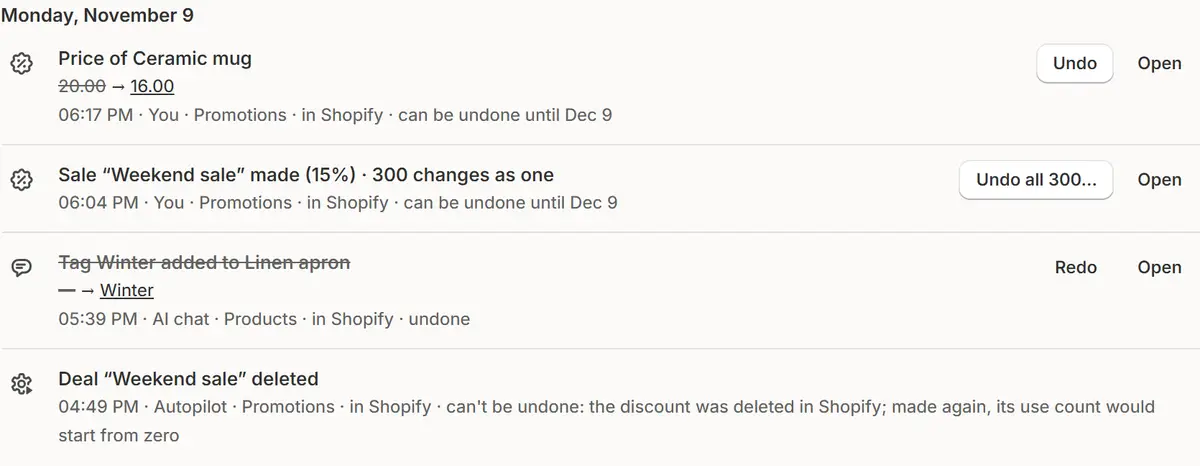
The app's real screen, with example store data. Undo a group
Changes made as one, such as a sale on 300 products or a supplier price list, are undone together after a preview. History says how many came back and which didn't, and why.
Decide on later changes
If something was changed after the app changed it, Undo shows what's there now and asks whether to put the old value back anyway.

Tips
- Ctrl+Z (⌘Z on a Mac) undoes your last change anywhere in the app; Ctrl+Shift+Z or Ctrl+Y puts it back.
- Ask the chat “undo my last change” or “what changed on this product”: it shows the changes and a button, and nothing is undone before you press it.
- Download what's shown as an Excel file.
What to check
- After an undo, the entry shows it was undone.
- Entries that can't be undone say why.
Common mistakes
- Trying to undo what can't be taken back: orders placed with a discount, emails sent, a deleted Shopify discount or a sale that ended. The app warns before you do them.
- Waiting too long: a change can be undone only while History keeps it.
The plan you need
On the Free planEvery plan. History keeps 7 days on Free, 30 on Pro and 90 on Business.
Your questions
How is a running sale undone?
By its own rules: it ends and its prices go back.
Who can see History?
It's your store's only, and it's erased when you uninstall the app.
Related tutorials
- Put prices backEvery price is saved before a sale changes it. Put back what an ended sale left, or rewind prices to a past day with the price time machine.
- Edit, pause and repeat salesChange a sale while it runs, move its dates on the timeline, pause one product or the whole sale, make it repeat, and run an ended sale again.
- Overview and the menuRead Market Manager's Overview: the numbers, the main insight, today's actions and this week's sales, then find every section in Shopify's menu.
Learn more
- Use caseRestore Original Prices After a Shopify SalePut every Shopify price back after a sale: originals are saved before the sale starts and restored when it ends, with History and Undo.
- FeaturePrice protectionSet your rules once: margin over cost, a lowest price, a largest discount. Every sale keeps them, and every change can be undone.
Run your next sale with Market Manager
Free plan. Paid plans start with a 7-day free trial.