Step by step
Open Products
Open Products in the menu. You're on its Overview.
Check all products
Click Check all products. You can leave the page while it runs.
Read the score
Your catalog gets a score out of 100, and products are Critical, Needs attention or Ready.
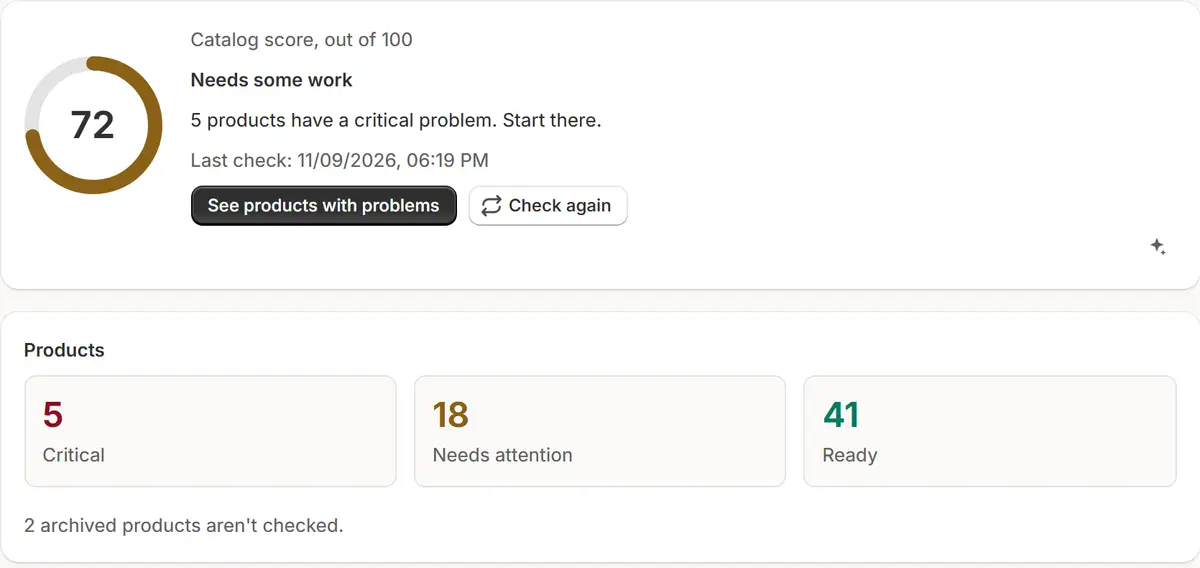
The app's real screen, with example store data. Open what to fix first
Click a problem under What to fix first to see its products on the To check tab.
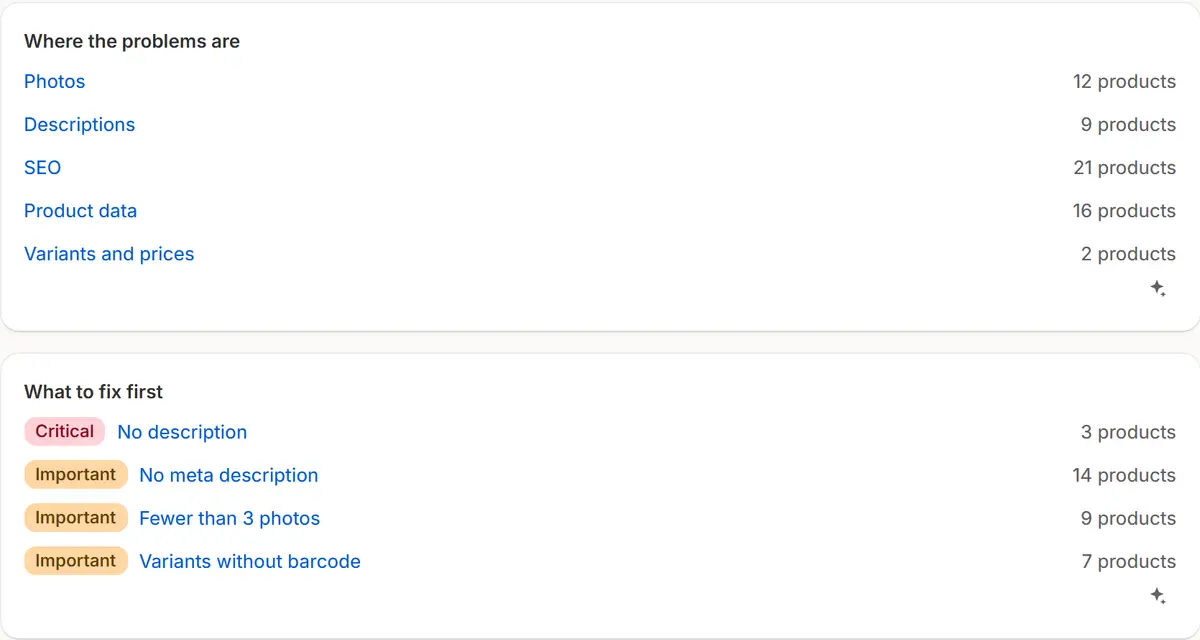
The app's real screen, with example store data. Fix a product
Click a product to see each problem and how to fix it, then Open in Shopify to fix it there.
Check again
The list changes after the next check. To see it at once, click Check again on Overview.
Tips
- Products that sell more count for more in the score, up to five times as much, so fixing best sellers moves it most.
- Filters on To check: search by title, a level, or an area: Photos, Descriptions, SEO, Product data, Variants and prices.
- In To check, Write text opens Product text with that product chosen.
What to check
- Critical products first: no photos, no description, no Shopify category, a SKU used twice or a price of 0.
- Settings → Products → Short description sets when a description counts as short.
Common mistakes
- Expecting a fix in Shopify to show at once: it shows after the next check, or after Check again.
- Looking for archived products: they aren't checked.
The plan you need
On the Free planThe catalog check is on every plan, Free included, with no limit on products.
Your questions
Does the catalog check change my products?
No. It only reads your store; nothing changes there.
How often does it check?
The first time when you click Check all products, then once a day and whenever you click Check again. A sale starting or ending goes first.
Related tutorials
- Product text with AIWrite a product's description, SEO title, SEO description and ad headlines from its photos and data, review them, write them in, and undo in one press.
- Overview and the menuRead Market Manager's Overview: the numbers, the main insight, today's actions and this week's sales, then find every section in Shopify's menu.
- Set up price protectionSet a maximum discount, a margin over cost and floor rules, add costs per item, and block discount codes on sale items, so every sale keeps your floor.
Learn more
- Use caseShopify Catalog Check: A Score and What to Fix FirstA daily check of your Shopify products' photos, descriptions, SEO, data and prices: a catalog score out of 100 and the problems to fix first.
- Use caseAI Product Descriptions and SEO Titles for ShopifyAI writes a Shopify product's description, SEO title and description and ad headlines from its photos and data. You check the text before it goes in.
- FeatureCatalog check and product textA daily check of your products and AI that drafts their descriptions and SEO text, for you to review.
Run your next sale with Market Manager
Free plan. Paid plans start with a 7-day free trial.