Step by step
Install the app
Open Market Manager on the Shopify App Store, press Install and approve it in your Shopify admin.
Choose a plan
When you open the app without a plan, Shopify's plan page opens first. Pick Free or a paid plan, and the app opens. Paid plans start with a free trial.
Land on Overview
The app opens on Overview, the first item in Shopify's menu: what's happening in your store, the main insight, today's actions and this week's sales. The first time, the robot offers a short tour.
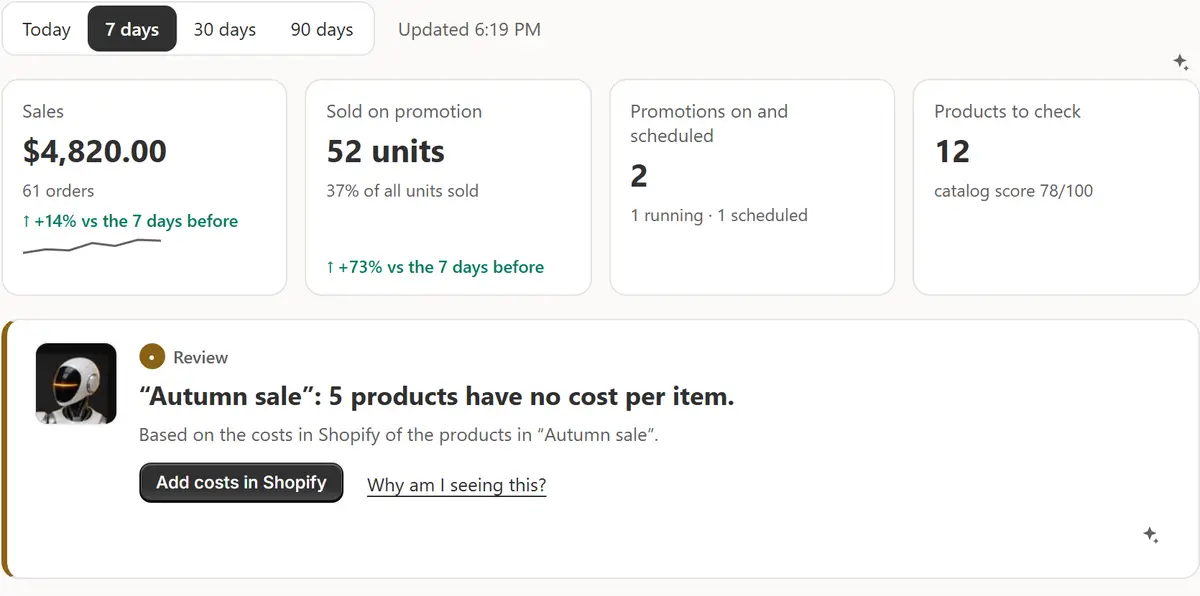
The app's real screen, with example store data. Follow the Setup guide
While your store is setting up, the Setup guide on Overview lists the first things to do: price protection, your first sale, sale badges in your theme, holidays and, if you like, Shopify Flow. Each step has a button that takes you there.
See it work on your products
On the Welcome card, Show me how it works — with my products has AI build a sale for your biggest collection and the nearest holiday. Require approval is on for that sale, so nothing changes until you press Approve on Sales.
Run a Store check
Open Promotions → Store check, or press Check my store in the status line. Each thing the app needs in your store gets a light, and where the app can fix something there is a button.
Tips
- Set your price protection ticks itself once you change Settings → Promotions → Price protection from the defaults or add a floor rule.
- The app follows each person's Shopify admin language: English, Spanish, French, German, Portuguese (Brazil), Japanese, Italian or Russian.
- An hour after you install, one welcome email arrives with three steps to your first sale. Reply to it to reach the developer.
What to check
- The status line under the Promotions tabs shows a green Running.
- Store check has no red lights.
- The Setup guide's finished steps are ticked.
Common mistakes
- Expecting sale badges right after installing: press Turn on in theme on the Badges page and click Save in the theme editor once.
- Leaving products without a cost per item: price protection then relies on your maximum discount alone.
The plan you need
On the Free planEvery plan, Free included. Free runs one sale at a time with up to 25 products and 20 AI requests a month.
Your questions
Does installing the app change my prices?
No. Prices change only when a sale you confirmed starts, and the first AI sale waits for your approval.
Can I start on the Free plan?
Yes. Pick Free on Shopify's plan page and the app opens; you can change plans later from the Plan page.
What does the Setup guide tick by itself?
Price protection, your first sale, and sale badges once Shopify reports the Sale badges app embed on in your published theme. The other steps have Mark as done.
Related tutorials
- Your first saleYour first sale in about a minute: pick products, the discount and the dates, check every price, start it, and see every original price come back.
- Overview and the menuRead Market Manager's Overview: the numbers, the main insight, today's actions and this week's sales, then find every section in Shopify's menu.
- Set up price protectionSet a maximum discount, a margin over cost and floor rules, add costs per item, and block discount codes on sale items, so every sale keeps your floor.
Learn more
- Use caseShopify Discount Scheduler: Sales That Start and End on TimeA discount scheduler for Shopify: bulk sales start and end on time, compare-at shows the saving and every original price comes back. Free plan.
- Use caseHow to Schedule a Sale on Shopify, Step by StepHow to schedule a sale on Shopify so prices drop and come back on their own: what Shopify offers, what it doesn't, and the steps with Market Manager.
- FeatureScheduled salesPick the products, the discount and the dates. The sale changes prices on time and puts every saved original back when it ends.
Run your next sale with Market Manager
Free plan. Paid plans start with a 7-day free trial.